
What you need
- An AI image tool that can edit a photo you upload, such as ChatGPT. Image features and limits depend on the tool and your plan.
- Your own family photo, with an OK from every adult in it. Photos of children should be your own.
- Ten minutes, and the patience for a retry or two.
Step 1: Pick the photo the AI can work with
The photo you pick matters more than the prompt. AI tools rebuild parts of the image, and faces they can't see clearly are the ones they get wrong.
- Sharp beats pretty. Choose the shot where every face is in focus and reasonably large on your screen, even if the room is a mess. The AI can replace the room. It can't recover a blurry face without guessing.
- Kids and babies are the hardest. Small or blurry children's faces are the most likely to come back looking like someone else.
- Skip heavy filters. Start from the original photo, not a beauty-filtered or heavily edited copy.
- Crop first. If your card printer wants a certain shape, crop to it before you edit, and leave room above heads for a greeting. Cropping afterward can cut someone out.
Step 2: Tell the AI what changes and what stays
The most common mistake is only describing the new look. Say just as clearly what must stay the same: faces, ages, expressions, poses and the number of people. Here's a simple starter prompt you can use for free:
Free starter prompt
Edit the uploaded photo. Keep every person's face, age, expression, hairstyle and pose exactly as they are, and keep the same number of people. Change only the background: a cozy living room with a decorated tree and warm string lights. Use soft, warm evening light on every face. Leave empty space at the top of the image. Do not add any text. Output a believable photograph at the same aspect ratio as the original.
This is a short, general prompt, not one of our tested prompts, so expect to retry more often.
A few habits that help with any prompt:
- One look per run. Pajamas, snow and a vintage frame in one prompt usually means one of them gets skipped or faces drift.
- Retry from the original. If a result is off, run the prompt again on your original photo. Editing an AI result again tends to stack small changes until people stop looking like themselves.
- Specific beats long. A few clear instructions work better than a paragraph of adjectives.
Step 3: Check every face before you print
Zoom in on each person. Look for changed eye color, a younger or older face, a different hairline or a missing person at the edge of the frame. If anyone looks off, regenerate from the original. Don't send a card where Grandma doesn't quite look like Grandma.
Step 4: Add the greeting yourself
AI tools often misspell words in images, and they love filling empty space with garland. In our own testing, ChatGPT filled the space we asked it to leave empty in 6 of 7 tries. The easy fix: ask for no text, then add your greeting and names in your phone's markup tool, a free design app, or the text tool on your card printer's site.
Three looks that work well
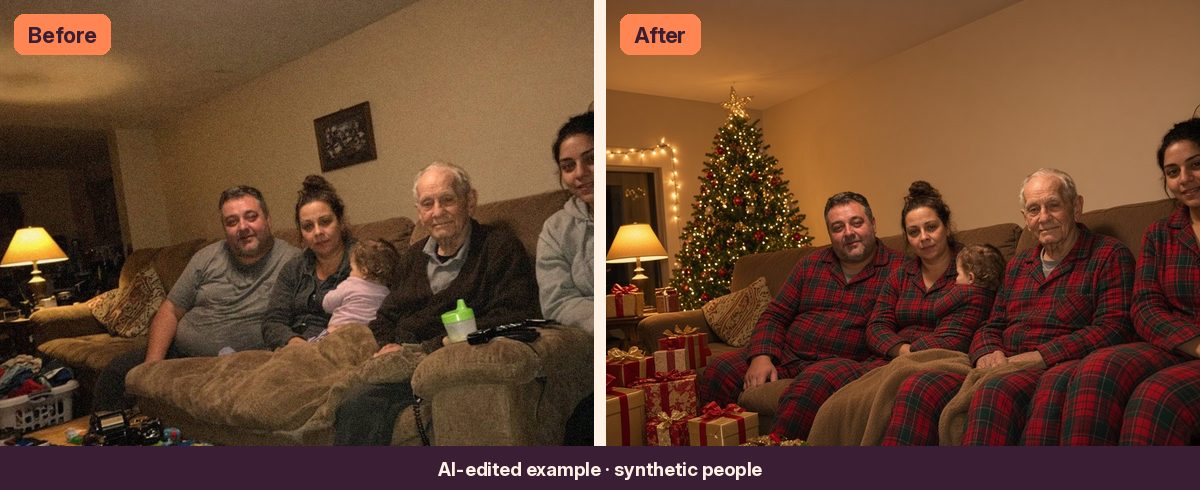
Matching pajamas by the tree
Same people, same couch, now in matching pajamas with a lit tree and gifts. This works best when everyone faces the camera.
See the before and after at the top of this guide.
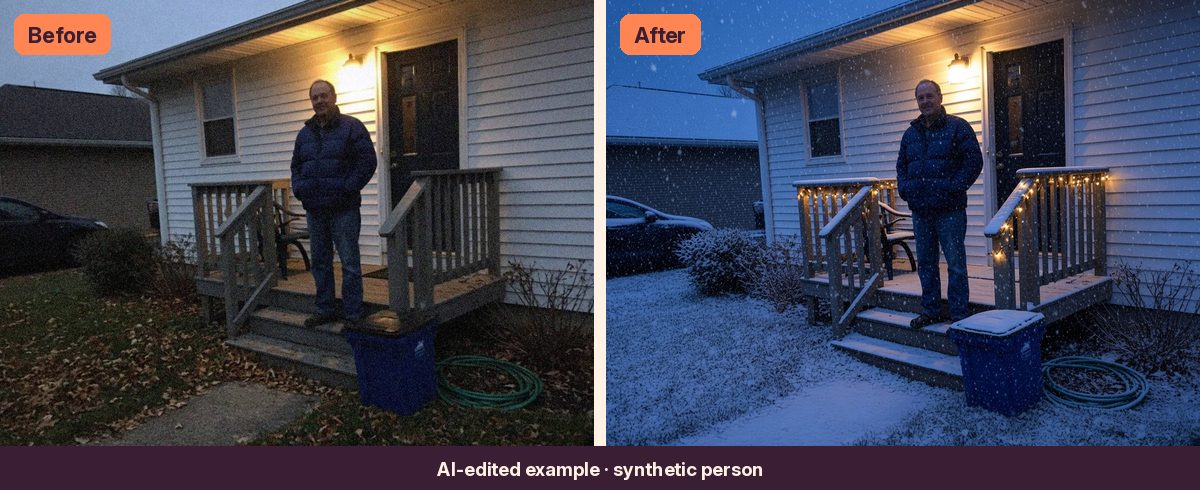
Snowfall and twinkle lights
Great for porch and front-yard photos. Ask for light or medium snow and say exactly where the string lights should go.
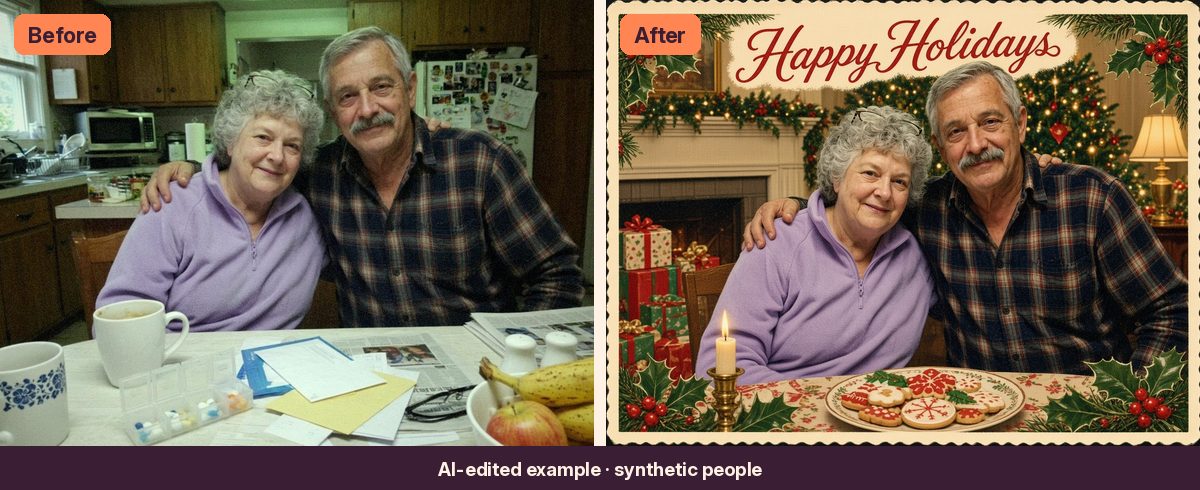
Vintage holiday postcard
A kitchen-table photo becomes an old-fashioned postcard with a festive frame. Ask the AI to tidy the table, too, so the pill box and mail don't end up on the card.
The shortcut: tested prompts for each look
The free prompt above will get you started. If you'd rather skip the trial and error, the Holiday Card Kit has a tested prompt for each look on this page, with fill-in blanks for colors and placement plus tips for common misses.
Quick answers
Will the AI keep everyone's face?
Usually, if the faces in your photo are sharp and reasonably large. Small or blurry faces, especially children's, are the most likely to change. Always zoom in and check, and regenerate from the original if someone looks different.
Can I print the result?
Yes, for your own cards. Ask for the same aspect ratio as your original, crop to your printer's size before editing, and check the result at full size before ordering.
Can I use someone else's photo?
Only edit photos you have the right to use, of people who agreed. Photos of children should be your own.